


A document scanning service in Singapore cannot price every original in the same way. Loose pages may be straightforward, while stapled files need preparation and bound books need a decision about whether the original must remain intact. Large A2, A1 and A0 drawings follow a separate large-format scanning workflow.
Key takeaways
- Ordinary documents need inspection when staples, files or bindings add manual preparation.
- A bound book can be trimmed only with permission, or scanned on a flatbed when it must be retained.
- Document and book scanning requires a custom quotation because the labour differs from job to job.
- Orange Print publishes online rates for straightforward A2, A1 and A0 scanning.
- A scanned file is not automatically a searchable archive or an editable CAD drawing.
The first question is not simply how many pages need scanning. It is what condition the originals are in and what must happen to them afterwards. The answer determines the preparation, scanner, labour and quotation method.
Choose the scanning method by the physical original
Documents, books and drawings behave differently during scanning. A useful quotation begins by separating the originals into groups rather than counting everything as one stack.
| Original | Preparation | Effect on the original | Quotation method |
|---|---|---|---|
| Loose documents | Check page order, size and condition | Pages remain loose | Custom quote after review |
| Stapled or bound documents | Remove staples or bindings, scan, then staple or assemble again as agreed | Handling depends on the original binding | Custom quote including labour |
| Bound book that may be trimmed | Trim the bound edge with the owner’s permission, then scan the loose pages | The original binding is permanently changed | Custom quote after inspection and permission |
| Bound book that must be retained | Scan the pages on a flatbed | The bound edge is not trimmed | Custom quote after inspection |
| A2, A1 or A0 drawing | Check sheet size, folds, tears and rolling | The full sheet feeds through the large-format scanner | Published online rate for straightforward sheets |
This table explains why a photograph and page estimate may be more useful than asking for a price per page before anyone has seen the material.
Why ordinary document scanning needs an inspection
Office files rarely arrive as one clean stack of loose sheets. They may contain corner staples, two-hole fasteners, plastic-ring binding, dividers, receipts and pages of different sizes. Each item affects the handling time.
Orange Print reviews the documents before quoting. The quotation can then include the scanning work and the labour needed to remove staples or bindings and staple or assemble the documents again. The agreed finishing should be written into the quotation so both sides know what will happen after scanning.
Do not remove every staple before the page order is understood. A staple may be the only thing keeping one set separate from the next. If several files look alike, label them before preparation and agree how the digital files should be divided.
Orange Print does not currently offer a standard online document-archiving product. Ordinary document work is inspected and quoted because the physical preparation can be more complicated than the scan itself.
How Orange Print scans bound books
A bound book has two possible workflows. The right one depends on whether the owner permits the binding to be changed.

Option 1: trim the bound edge with permission
If the owner does not need to retain the original binding, Orange Print can ask for permission to trim the bound edge. The pages become loose and can then be handled as individual sheets.
Trimming is permanent. It should never be assumed from an enquiry that only says “scan this book”. The owner must understand and approve what will happen to the physical book before the work begins.
Option 2: retain the book and use a flatbed scanner
If the book must remain bound, Orange Print uses a flatbed scanner. Each page is positioned and scanned without trimming the bound edge.
This method keeps the binding intact, but the book still needs to be inspected. Its size, opening angle, page condition and number of pages affect the handling required. A fragile or tightly bound item should be reviewed before any promise is made.
Tell the printer why retention matters. A replaceable training manual and a rare signed book do not carry the same handling risk, even if both have the same number of pages.
Large-format scanning for A2, A1 and A0 drawings
Large drawings use Orange Print’s large-format scanning service. Straightforward A2, A1 and A0 sheets are scanned in-house on a Canon imagePROGRAF TZ-5320 at 300 dpi, in black and white or colour.
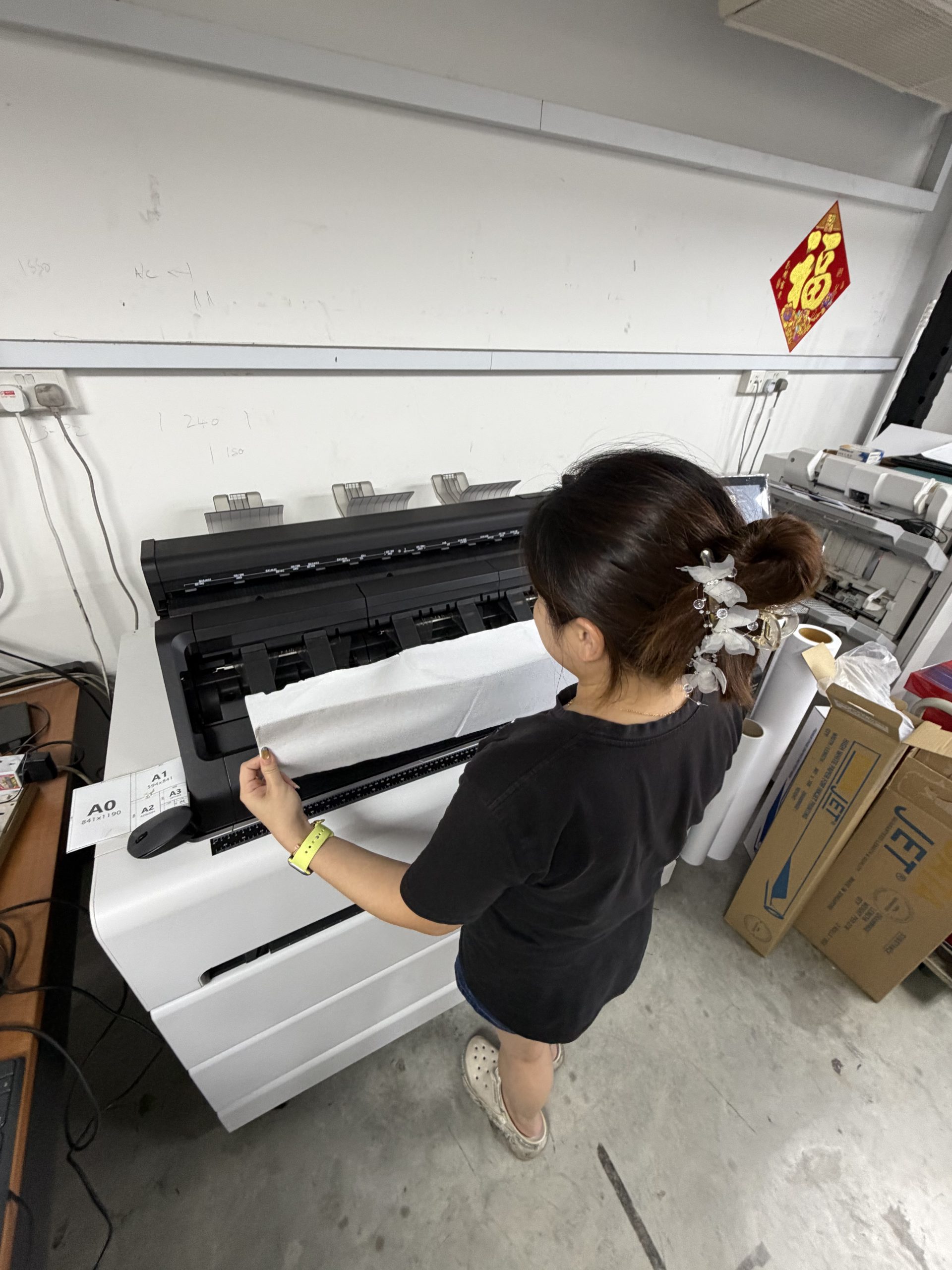
The published output formats are PDF, TIFF and JPEG. The live calculator gives the current price for the selected size, colour mode and quantity. Published rates currently start from the following amounts:
| Size | Black and white | Colour |
|---|---|---|
| A2 | From S$1.30 per sheet | From S$2.40 per sheet |
| A1 | From S$2.20 per sheet | From S$4.00 per sheet |
| A0 | From S$3.30 per sheet | From S$6.00 per sheet |
A S$15 minimum order applies, and quantity breaks are published at 10 and 51 sheets. Use the calculator for the current amount rather than copying an old quotation.
Rolled, folded, torn or fragile drawings should still be shown to Orange Print before the order is confirmed. A published sheet rate does not remove the need to assess an original that may not feed normally.
PDF, TIFF or JPEG: which format should you request?
The best format depends on what you plan to do with the scan. Orange Print’s published large-format service provides PDF, TIFF and JPEG.
| Format | Useful for | What to remember |
|---|---|---|
| Multi-page sets, viewing, sharing and reprinting | Ask whether sheets should be combined or kept as separate files | |
| TIFF | Higher-quality image storage and reproduction workflows | Files may be larger and less convenient for everyday sharing |
| JPEG | Quick viewing and smaller individual image files | It uses image compression and is not ideal for every long-term workflow |
For ordinary documents and books, confirm the required output during quotation. Do not assume that every job includes the same file structure, naming or searchable text.
A scan, searchable archive and editable CAD file are different
A normal scan captures the page as an image. Saving that image inside a PDF does not automatically make every word searchable, and scanning a technical drawing does not turn its lines into editable AutoCAD objects.
OCR uses software to recognise text so that it may be searched or copied. Indexing adds an agreed naming or reference structure. Raster-to-CAD work converts or redraws image information into an editable drawing format. Each is additional work with different quality checks.
Orange Print’s standard large-format page publishes PDF, TIFF and JPEG scanning. If you need OCR, indexing, searchable PDFs, editable CAD or integration into a document-management system, state that requirement before the quotation. Do not assume it is included.
Organise the originals before they become digital files
Scanning a disorganised pile can produce a disorganised folder. Decide how the files should be grouped and named before preparation begins.
- Separate each file, book or drawing set clearly.
- Mark the required order without writing over important content.
- State whether blank pages should be retained.
- Provide a simple naming list if project references matter.
- Decide whether the result should be one file, one file per section or one file per sheet.
- Keep one record of what was handed over.
For a large drawing set, the title block or drawing number may be the most useful reference. For office documents, the physical file label may be more practical. Naming and indexing requirements should be agreed because they add handling time.
Scan an old drawing, then print a fresh copy
A useful reason to digitise an old drawing is to reduce repeated handling of the original. Once the scan has been checked, a fresh working copy can be produced through Orange Print’s A0, A1 and A2 plot printing service.
The new print is only as useful as the scan. Check that title blocks, revision notes, fine lines and handwritten markings are readable before relying on the digital file for reprints. Scanning cannot restore information that is already missing from a faded or damaged original.
What to send for a scanning quotation
For documents and books, photographs help Orange Print estimate the preparation before arranging an inspection. Show the outside, binding, page edges and a representative inside page without exposing confidential information unnecessarily.
- Type of original: loose pages, stapled files, bound documents, books or drawings
- Approximate number of pages, files, books or sheets
- Page sizes and whether mixed sizes are present
- Binding type and whether staples must be put back
- Whether a book may be trimmed or must remain intact
- Colour or black-and-white requirement
- Required file format and grouping
- Any naming, OCR, indexing or editable-file requirement
- Condition of fragile, folded, rolled or torn originals
- Required completion date
For straightforward A2, A1 and A0 sheets, use the online calculator. For documents, files and books, arrange an inspection-based quotation.
Frequently asked questions
Can Orange Print scan a bound book without cutting it?
Yes. If the book must be retained, Orange Print can use a flatbed scanner without trimming the bound edge. The book still needs inspection because its size, binding and condition affect the handling.
Will Orange Print cut the spine of my book?
Only with your permission. Trimming the bound edge makes the pages loose and permanently changes the original book. If retention matters, tell Orange Print before quotation so flatbed scanning can be considered.
Why does document scanning need an inspection before quotation?
Documents may arrive stapled, bound or mixed with different page sizes. The quotation must account for scanning and the labour needed to remove bindings and staple or assemble the documents again.
Can Orange Print scan A0 and A1 drawings?
Yes. Orange Print scans A2, A1 and A0 sheets in-house at 300 dpi in black and white or colour. Published output formats are PDF, TIFF and JPEG.
Will a scanned drawing become editable in AutoCAD?
No. A standard scan creates a raster image, even when it is saved as a PDF. Editable CAD requires a separate conversion or redrawing process and should be requested before quotation.
How much does large-format scanning cost?
Published rates start from S$1.30 for A2 black and white, S$2.20 for A1 black and white and S$3.30 for A0 black and white. A S$15 minimum order applies. Use the live calculator for the current price.
Show us the originals before we quote the handling
The correct scanning method depends on the condition and construction of the material. A clear inspection protects the page order, the physical original and the accuracy of the quotation.
Use the large-format scanning calculator for straightforward A2, A1 and A0 sheets. For loose documents, stapled files and bound books, WhatsApp Orange Print with photographs and an approximate quantity so the team can arrange an inspection-based quotation.